Microsoft Fabric just fixed its biggest CI/CD problem – here’s what changed

Working with Git in Fabric used to mean copying entire workspaces, blind commits, and hoping nothing breaks. Not anymore. Microsoft just shipped branched workspaces, selective branching, and a real diff view. Here’s what changed and why it matters.

Anyone who’s tried to implement CI/CD in Microsoft Fabric knows it’s been… not great. Sure, you could connect a workspace to a repo, but working on feature branches meant manually juggling between workspaces, tracking what changed where, and praying you don’t overwrite something important.

The March 2026 update finally fixes this.

Three features that change the game

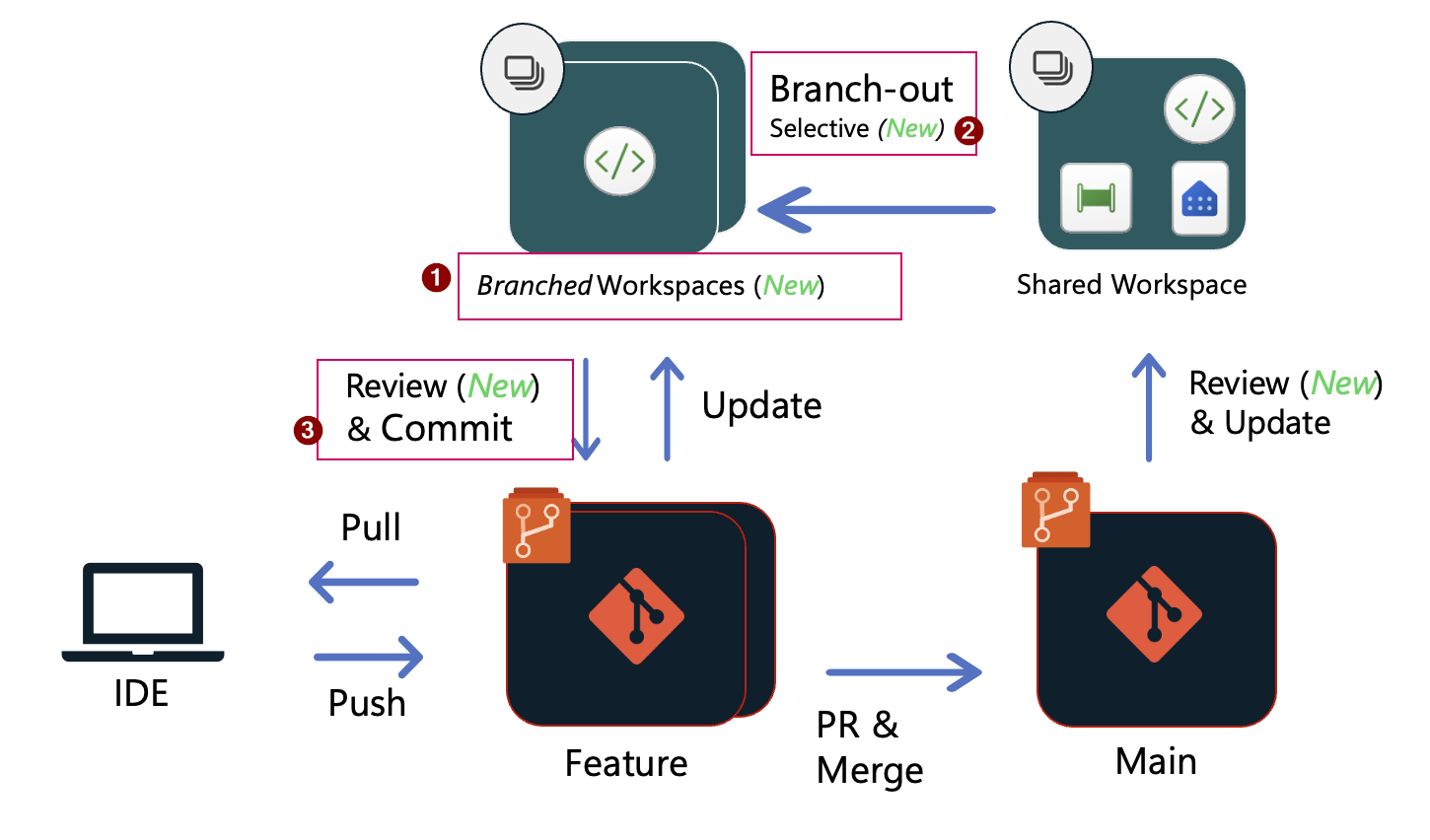
1. Branched workspaces – see what came from where

When you branch out from a main workspace, Fabric now creates a formal relationship between workspaces. In practice:

  • the navigation tree shows which workspace is a „child” of which
  • no more guessing where a workspace came from
  • you can quickly jump back to the source workspace when you’re done

It sounds simple, but if you’ve ever had 15 feature workspaces open and forgot which one connects to which branch – you know this is huge.

2. Selective branching – take only what you need

Before this update, branching out meant copying the entire workspace. Got 200 items but only need to change 3? Too bad – you’re getting all 200.

Now you can select specific items during branch-out:

  • pick only the notebooks, pipelines, or reports you’ll actually touch
  • smaller workspace = faster sync times
  • less clutter, fewer accidents

This is especially useful for large workspaces where full sync could take minutes.

3. Compare code changes – finally a proper diff view
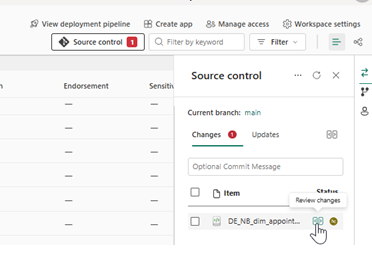
The new compare experience shows exactly what changed before you commit or update:

  • side-by-side diff for each item
  • see changes at file level, not just „something changed”
  • resolve conflicts visually instead of guessing

If you’ve used VS Code or any decent Git client, this will feel familiar. About time Fabric caught up.

How it works in practice

Let’s say you’re working on a sales pipeline and need to add a new transformation step.

Step 1: Open your dev workspace connected to the main branch

Step 2: Go to source control panel → branches tab → branch out

Step 3: Select „create new workspace”, name your branch, and tick „select items individually”

Step 4: Pick only the pipeline and related notebooks you need

Step 5: Make your changes in the isolated workspace

Step 6: Use compare view to review what you changed

Step 7: Commit to your feature branch, create a PR, merge back to main

Step 8: The main workspace gets notified about new commits – update and done

No more copying 50 items just to change one. No more „wait, did I already commit this?”. No more blind updates hoping nothing breaks.

Things to keep in mind

  • these features are in preview – expect some rough edges
  • maximum 1000 items per workspace (same as before)
  • branch names limited to 244 characters
  • file paths can’t exceed 250 characters
  • if you use workspace identity, be careful with branch-out – it can get tricky

Why this matters

Fabric has been pushing hard on the „unified platform” angle, but without solid CI/CD, enterprise teams couldn’t really adopt it for production workloads. You can’t tell a team of 10 engineers to coordinate changes through Slack messages and hope for the best.

These Git improvements aren’t flashy, but they’re exactly what Fabric needed to be taken seriously for team-based development.