
Picture this: You’re a data engineer at a healthcare organization managing transaction data from many systems. Your current setup requires three separate Azure Data Factory pipelines, manual dependency management, and constant monitoring. Every time the Bronze layer updates, you manually trigger Silver layer refreshes, then wait to schedule Gold layer aggregations. One failed pipeline notification arrives at 3 AM.
This is the world before Materialized Lake Views (MLV).
MLV fundamentally changes how you build data pipelines in Microsoft Fabric. Instead of orchestrating multiple jobs, writing validation logic, and monitoring each stage separately, you declare transformations in SQL and let Fabric handle the rest. The system automatically manages dependencies, triggers refreshes only when data changes, enforces data quality rules, and generates visual lineage maps—all without writing orchestration code.
Think of MLV as the bridge between declarative SQL and operational data engineering. You describe what you want, not how to compute it. Fabric figures out the execution strategy.
What Are Materialized Lake Views? Understanding the Fundamentals
A Materialized Lake View is a persisted, automatically-updated copy of a SQL transformation result that lives inside your Microsoft Fabric Lakehouse as a Delta table. Unlike a standard SQL view (which recalculates on every query), an MLV pre-computes and physically stores results, making subsequent queries lightning-fast.
Key Distinction:
- Standard View = Virtual layer, recalculates every time
- Materialized View = Physical storage, precomputed results
- MLV in Fabric = Materialized view + automatic refresh + dependency management + built-in data quality + visual lineage
How MLV Integrates with Medallion Architecture
MLV was purpose-built for the medallion pattern—Bronze (raw data) → Silver (cleaned/validated) → Gold (analytics-ready). Instead of writing separate Spark jobs for each layer:
-- SILVER LAYER: Cleanse and deduplicate in one SQL statement
CREATE MATERIALIZED LAKE VIEW silver.transactions_clean AS
SELECT
transaction_id,
patient_id,
amount,
transaction_date,
ROW_NUMBER() OVER (PARTITION BY transaction_id ORDER BY ingestion_time DESC) AS rn
FROM bronze.raw_transactions
WHERE amount > 0 AND deleted_flag = 0
QUALIFY rn = 1;

-- GOLD LAYER: Aggregate and prepare for BI
CREATE MATERIALIZED LAKE VIEW gold.daily_revenue_summary AS
SELECT
transaction_date,
SUM(amount) AS daily_total,
COUNT(*) AS transaction_count,
AVG(amount) AS avg_transaction
FROM silver.transactions_clean
GROUP BY transaction_date;
That’s it. Fabric automatically:
- ✓ Manages the execution order (Silver before Gold)
- ✓ Refreshes only when source data changes
- ✓ Tracks dependencies visually
- ✓ Monitors execution and logs
Why MLV Changes the Game: Real-World Impact
Before MLV: The Hidden Costs
- Development Time: 2-3 weeks to build medallion architecture with orchestration
- Operational Overhead: Constant pipeline monitoring, failed job alerts, troubleshooting
- Code Complexity: Spark notebooks + dependency scripts + error handling = thousands of lines
- Data Quality: Manual validation logic scattered across multiple jobs
- Cost: Compute resources wasted refreshing unchanged data
- Debugging: „Why didn’t my Gold layer update?” requires digging through job logs
After MLV: The New Reality
- Development Time: 2-3 days to implement entire medallion stack
- Operational Overhead: 95% reduction—Fabric manages everything
- Code Complexity: Pure SQL, no orchestration required
- Data Quality: Constraints built-in, violations tracked automatically
- Cost: 30-40% reduction through intelligent refresh detection
- Debugging: Visual lineage + execution logs + data quality dashboard
Real Example from a Healthcare Organization: A practice management system integration went from 120 days of development (with multiple engineers) to 8 days with MLV. The team redirected those 112 days to building additional analytics layers instead of maintaining orchestration infrastructure.
How to Create Your First MLV: Step-by-Step Implementation
Prerequisites Checklist
Before you start, ensure you have:
- ✓ Microsoft Fabric enabled workspace
- ✓ Lakehouse with schemas enabled (critical—you cannot enable schemas on existing lakehouses)
- ✓ Fabric Runtime 1.3 or higher
- ✓ Data already in Bronze layer (as Delta tables or shortcuts)
Step 1: Create Schemas
Schemas are required and act as organizational containers for your MLV:
CREATE SCHEMA IF NOT EXISTS silver;
CREATE SCHEMA IF NOT EXISTS gold;
Step 2: Build Your Silver Layer MLV
Start with data cleansing—remove duplicates, validate data types, filter invalid records:
CREATE MATERIALIZED LAKE VIEW silver.customer_base AS
SELECT
customer_id,
UPPER(TRIM(customer_name)) AS customer_name,
LOWER(email) AS email,
created_date,
CASE
WHEN lifetime_value IS NULL THEN 0
ELSE lifetime_value
END AS lifetime_value
FROM bronze.customers
WHERE
deleted_at IS NULL
AND email IS NOT NULL
AND customer_id IS NOT NULL;
Step 3: Add Data Quality Constraints
Constraints automatically drop or fail on invalid records.
Key Options:
ON MISMATCH DROP= Silently exclude invalid rows (better for data cleaning)ON MISMATCH FAIL= Stop the entire MLV refresh on violation (better for critical data)
CREATE MATERIALIZED LAKE VIEW silver.transactions_validated
(
CONSTRAINT positive_amount CHECK (amount > 0) ON MISMATCH DROP,
CONSTRAINT valid_date CHECK (transaction_date >= '2020-01-01') ON MISMATCH DROP,
CONSTRAINT required_customer CHECK (customer_id IS NOT NULL) ON MISMATCH FAIL
) AS
SELECT
transaction_id,
customer_id,
amount,
transaction_date,
transaction_type
FROM bronze.transactions
WHERE year(transaction_date) >= 2020;
Step 4: Create Gold Layer for Analytics
Aggregate and denormalize for BI consumption:
CREATE MATERIALIZED LAKE VIEW gold.customer_monthly_metrics AS
SELECT
DATE_TRUNC('MONTH', t.transaction_date) AS month,
c.customer_id,
c.customer_name,
COUNT(*) AS transaction_count,
SUM(t.amount) AS monthly_revenue,
AVG(t.amount) AS avg_transaction_value,
COUNT(DISTINCT t.transaction_type) AS transaction_types
FROM silver.customer_base c
LEFT JOIN silver.transactions_validated t
ON c.customer_id = t.customer_id
GROUP BY
DATE_TRUNC('MONTH', t.transaction_date),
c.customer_id,
c.customer_name;
Step 5: Schedule and Monitor
- Go to your Lakehouse → Manage Materialized Lake Views
- Review auto-generated lineage (visualizes dependencies)
- Click Schedule → Set refresh frequency (daily, hourly, etc.)
- Open lineage UI to monitor runs, view execution logs, track data quality metrics
What's New To Come?
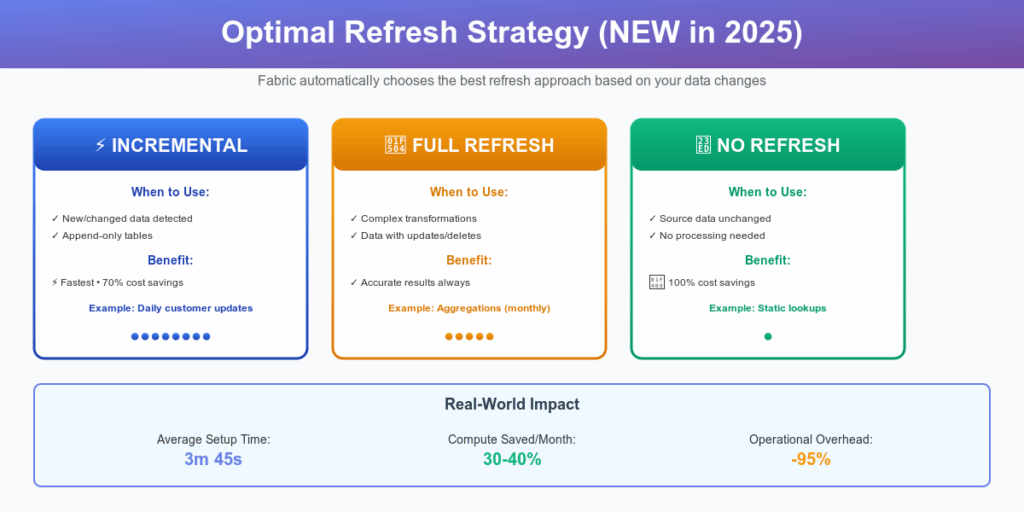
Optimal Refresh Strategy (September 2025)
The most significant update in 2025 is Optimal Refresh—Fabric now intelligently determines the best refresh strategy for each MLV:
- Incremental Refresh: Only processes changed/new data (when supported)
- Full Refresh: Recalculates entire dataset (fallback for complex queries)
- No Refresh: Skips execution if source tables unchanged (saves costs)
This means your monthly aggregation table won’t waste compute capacity refreshing when source data hasn’t changed. This feature alone can reduce operational costs by 30-40% for large pipelines.
MLV vs. Alternatives: Making the Right Choice
| Aspect | ADF Pipelines | Materialized Lake Views (MLV) |
|---|---|---|
| Setup Time | 5-10 days | 1-2 days |
| Code Complexity | Complex orchestration | Pure SQL |
| Dependency Management | Manual | Automatic |
| Cost Optimization | Static refresh schedules | Intelligent (skips unchanged) |
| Data Quality | Custom validation | Built-in constraints |
| Debugging | Monitor Hub investigation | Visual lineage + execution logs |
| When to Use | Complex ETL logic, non-SQL transformations | Medallion architecture, SQL-first pipelines |
Common Gotchas and Solutions
Gotcha 1: Schema Names Must Be Lowercase
-- ❌ This will fail
CREATE MATERIALIZED LAKE VIEW SILVER.my_view AS SELECT * FROM bronze.data;

-- ✓ This works
CREATE MATERIALIZED LAKE VIEW silver.my_view AS SELECT * FROM bronze.data;Why: Fabric’s schema handling is case-sensitive for all-caps names. Use lowercase.
—————————————-
Gotcha 2: ISNULL() Syntax from SQL Server Doesn’t Work
-- ❌ SQL Server syntax (fails in Spark)
SELECT ISNULL(amount, 0) AS clean_amount FROM data;

-- ✓ Spark SQL syntax
SELECT COALESCE(amount, 0) AS clean_amount FROM data;Why: Spark’s ISNULL() checks nullness (returns TRUE/FALSE), doesn’t replace values.
—————————————-
Gotcha 3: Constraint Attributes Must Be Explicitly Selected
-- ❌ Constraint references column not in SELECT
CREATE MATERIALIZED LAKE VIEW silver.clean_data
(CONSTRAINT check_dept CHECK (dept_id IS NOT NULL) ON MISMATCH DROP) AS
SELECT name, salary FROM bronze.employees;

-- ✓ Include constraint columns explicitly
CREATE MATERIALIZED LAKE VIEW silver.clean_data
(CONSTRAINT check_dept CHECK (dept_id IS NOT NULL) ON MISMATCH DROP) AS
SELECT name, salary, dept_id FROM bronze.employees;
—————————————-
Gotcha 4: No Cross-Workspace MLV Dependencies
MLV in Workspace A cannot reference MLV in Workspace B. Workaround: Use Lakehouse shortcuts to bring source data into your workspace, then reference it in MLV.
—————————————-
Gotcha 5: CTE Performance in MLV
Avoid complex CTEs in MLV definitions—Fabric has difficulty tracking dependencies through CTEs. Better approach: Break into multiple silver-layer MLVs and chain them.
-- ❌ Complex CTE (lineage tracking issues)
CREATE MATERIALIZED LAKE VIEW gold.final AS
WITH step1 AS (SELECT ...),
     step2 AS (SELECT ... FROM step1),
     step3 AS (SELECT ... FROM step2)
SELECT * FROM step3;

-- ✓ Layered approach (clear lineage)
CREATE MATERIALIZED LAKE VIEW silver.step1 AS SELECT ...;
CREATE MATERIALIZED LAKE VIEW silver.step2 AS SELECT ... FROM silver.step1;
CREATE MATERIALIZED LAKE VIEW gold.final AS SELECT ... FROM silver.step2;